
Integrations
Connect the cart drawer to Klaviyo, product review apps, and checkout apps.
Where to find it: in the cart editor, click Integrations in the Cart Editor Settings list.
Integrations connect the drawer to other apps on your store. Most have their own switch, and they're all off until you turn them on.
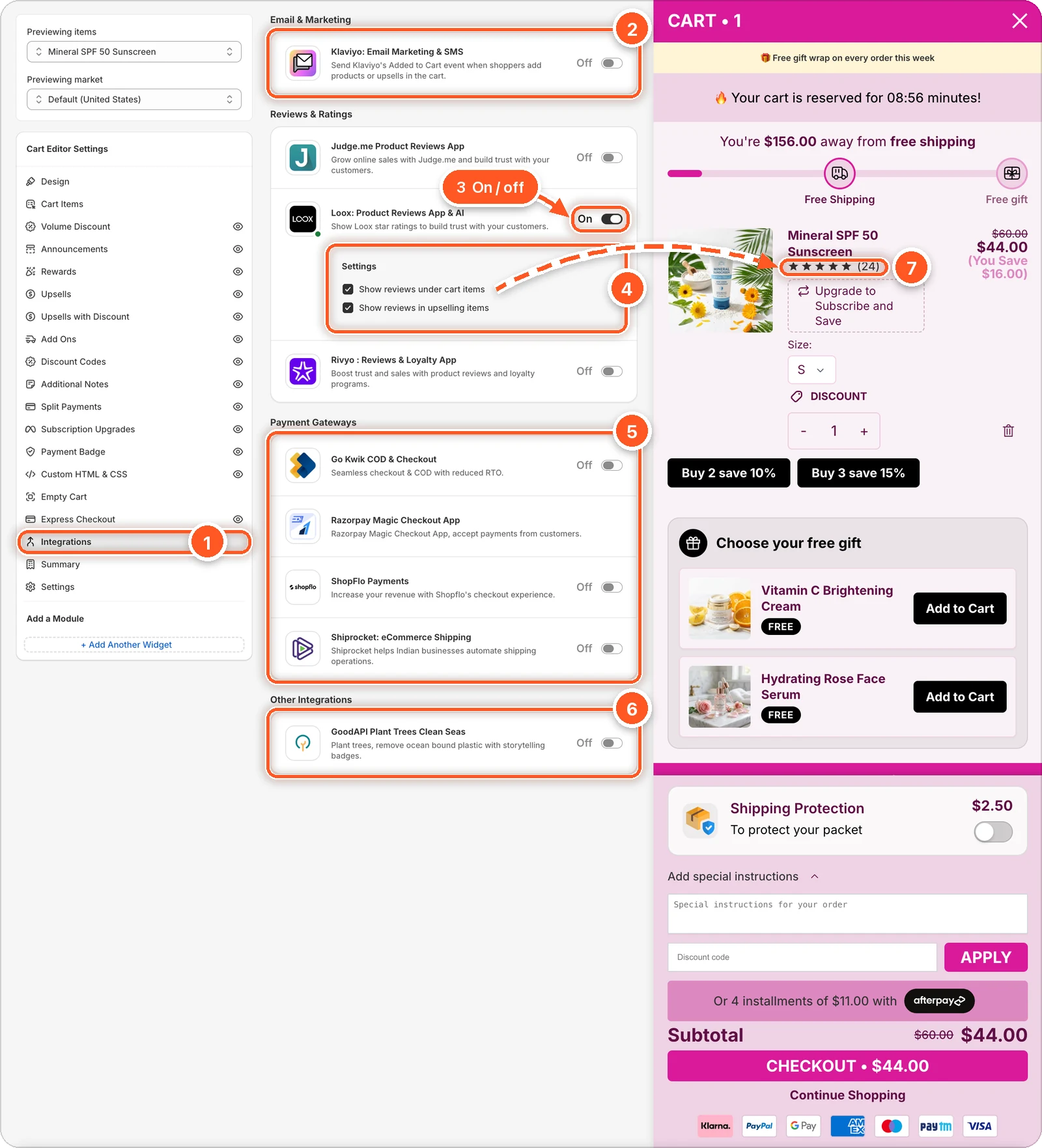
In this screenshot Loox is switched on (3) with both of its settings ticked (4). Look under the product name in the preview: the stars (7) come from Show reviews under cart items. The editor shows sample stars; on your store, the product's real Loox rating shows instead.
| # | Section | What it's for |
|---|---|---|
| 1 | Integrations tab | Open this tab in the sidebar. It has no eye icon; each integration has its own switch instead. |
| 2 | Email & Marketing | Klaviyo. |
| 3 | Loox's switch | Turns that integration on. It reads On when it's on. Judge.me and Rivyo, in the same Reviews & Ratings card, work the same way. |
| 4 | Loox's Settings | Options show up under an integration once it's on. For review apps, they choose where the stars appear. |
| 5 | Payment Gateways | GoKwik, Razorpay, ShopFlo, and Shiprocket. Razorpay has no switch. |
| 6 | Other Integrations | GoodAPI. |
| 7 | Stars in the preview | Loox's stars under the cart item, from Show reviews under cart items. |
Turn on an integration
Make sure the other app is installed and set up on your store.
Find it in the list and switch it on.
Set any options that appear under it.
Click Save.
Email & Marketing
Klaviyo: Email Marketing & SMS sends Klaviyo's Added to Cart event when shoppers add products or upsells in the drawer, so your abandoned cart flows trigger.
- Klaviyo's onsite tracking (its app embed) must be on in your theme.
- In Klaviyo, use the Added to Cart metric without the Shopify icon. Klaviyo only records it for visitors it has identified.
- If your theme already has Klaviyo's Added to Cart code snippet, remove it to avoid counting events twice.
Reviews & Ratings
Show star ratings from your review app inside the drawer. Each has two options:
| App | Show reviews under cart items | Show reviews in upselling items |
|---|---|---|
| Judge.me Product Reviews App | Off | On |
| Loox: Product Reviews App & AI | Off | On |
| Rivyo : Reviews & Loyalty App | On | On |
The table shows each app's starting values. Tick or untick to choose where stars appear. In the screenshot above, both of Loox's boxes are ticked.
In the editor preview, Judge.me and Loox show sample stars so you can see where they'll sit. Rivyo's stars only show on your store.
Payment Gateways
These checkout apps take over the drawer's Checkout button: instead of going to Shopify checkout, it opens the app's own checkout.
- Go Kwik COD & Checkout
- ShopFlo Payments
- Shiprocket: eCommerce Shipping
- Razorpay Magic Checkout App — has no switch here. Contact support to set it up.
Only turn these on if the app is live on your store
With a checkout app turned on here, the Checkout button calls that app. If the app isn't installed, or its script isn't on your store, the Checkout button does nothing. Turn on only one checkout app at a time.
Other Integrations
GoodAPI Plant Trees Clean Seas shows GoodAPI's impact badge in the drawer. Choose its Select position: Below Cart Items (default), Below Checkout Button, or Custom HTML Position.