
Additional Notes
Add an order notes box to the cart so shoppers can leave special instructions.
Where to find it: in the cart editor, click Additional Notes in the Cart Editor Settings list.
Additional notes add an Add special instructions row to the cart. Shoppers tap it to open a text box and type a note, such as "Please gift wrap" or "Leave at the back door". The note is saved as the order note, so you see it on the order in Shopify.
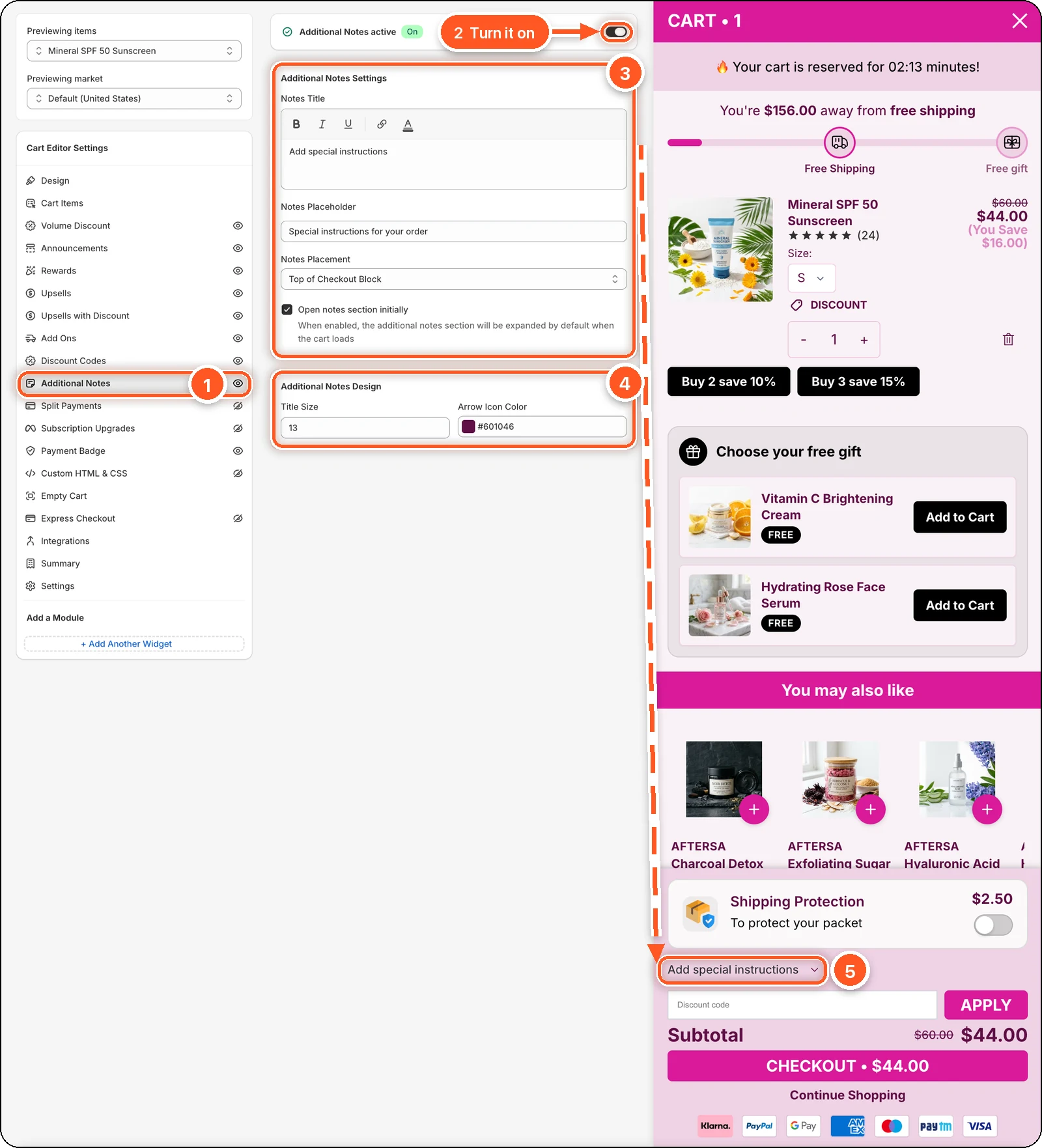
In this screenshot Additional Notes is switched on with Notes Placement set to Top of Checkout Block. You can see the Add special instructions row in the cart footer, just above the discount code field (5).
| # | Section | What it's for |
|---|---|---|
| 1 | Additional Notes tab | Open this tab. The eye icon shows notes are on. A crossed-out eye means they're off. |
| 2 | Additional Notes switch | Turns the notes row on or off. |
| 3 | Additional Notes Settings | The row's title, the box's placeholder, where the row shows, and whether it starts open. |
| 4 | Additional Notes Design | Title size and arrow colour. |
| 5 | Notes row in the cart preview | Shoppers tap Add special instructions to open the text box. |
Why the row looks closed in the preview
Open notes section initially is ticked in the screenshot, but the preview row is still closed. The setting takes effect when the cart loads, so it doesn't open the row the moment you tick it. Check it on your store.
Turn it on
Switch on Additional Notes at the top.
Change the Notes Title and Notes Placeholder if you like.
Choose Notes Placement:
- Top of Checkout Block — in the footer, above the discount code field. The default.
- Below Cart Items — right after the products.
Tick Open notes section initially if you want the box open from the start.
Click Save.
Settings
| Setting | What it does | Default |
|---|---|---|
| Notes Title | The row's title. Use the toolbar for bold, italic, underline, a link, or the text colour. | Add special instructions |
| Notes Placeholder | The grey hint inside the text box. | Special instructions for your order |
| Notes Placement | Top of Checkout Block or Below Cart Items. | Top of Checkout Block |
| Open notes section initially | Shows the text box open when the cart loads. | Off |
Design
- Title Size — the title's font size. Default 13.
- Arrow Icon Color — the colour of the arrow next to the title. To change the title's own colour, use the text colour button in the Notes Title toolbar.
Where to find the notes
Open the order in Shopify → Orders. The shopper's text is in the order's Notes.