
Express Checkout
Show express checkout buttons, such as Shop Pay, Apple Pay, Google Pay, or PayPal, under the checkout button in the cart.
Where to find it: in the cart editor, click Express Checkout in the Cart Editor Settings list. Inside the tab it's called Accelerated Checkout Buttons.
Express checkout buttons let shoppers pay in a tap with the express payment methods you've turned on in Shopify, such as Shop Pay, Apple Pay, Google Pay, or PayPal. They show directly under the drawer's checkout button.
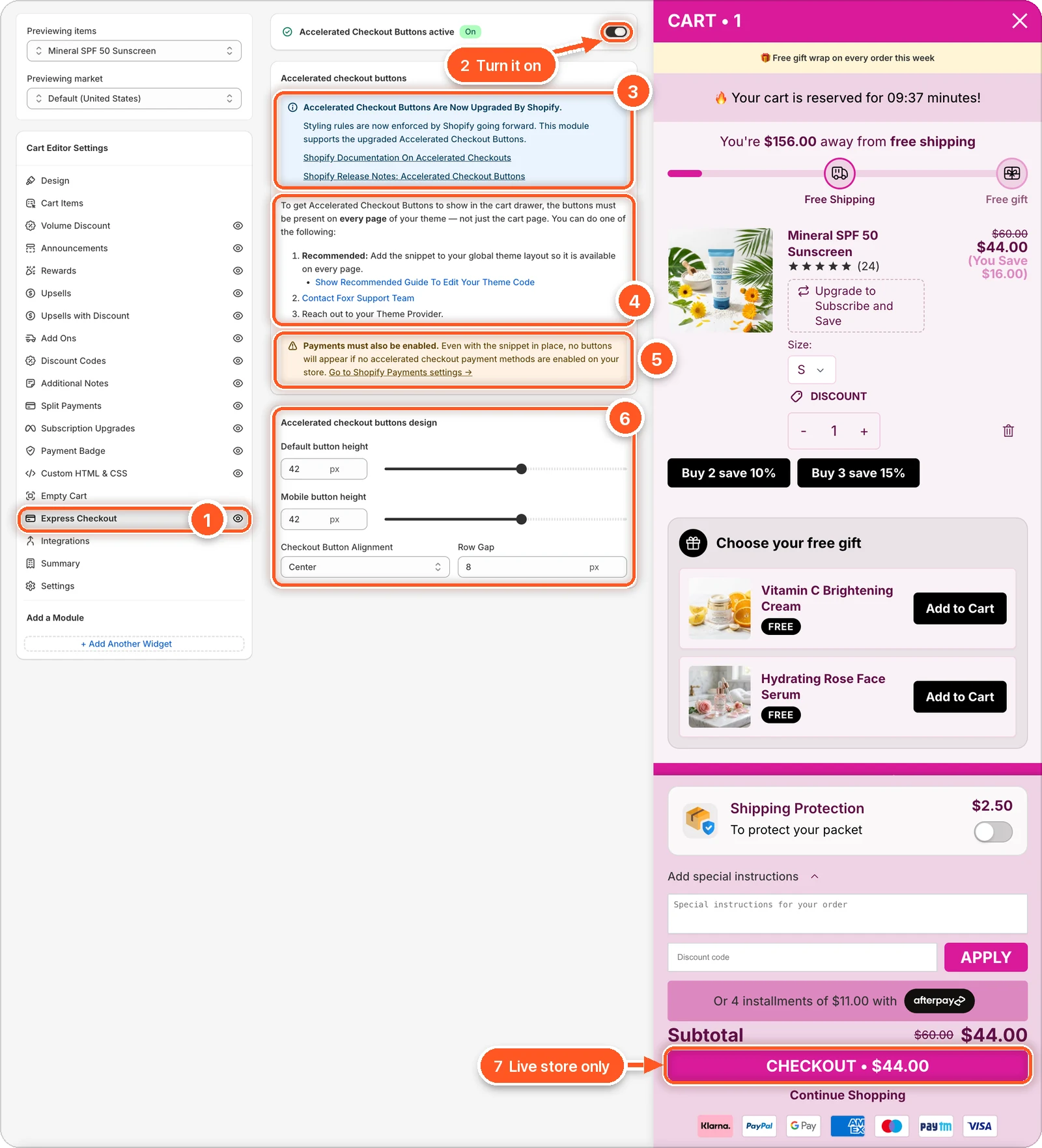
In this screenshot Accelerated Checkout Buttons is switched on, but the cart preview still shows no express buttons under Checkout (7). That's expected: the editor preview never shows them. Check them on your live store.
| # | Section | What it's for |
|---|---|---|
| 1 | Express Checkout tab | Open this tab. The eye icon shows the buttons are on. A crossed-out eye means they're off. |
| 2 | Accelerated Checkout Buttons switch | Turns the buttons on or off. |
| 3 | Upgraded By Shopify | Shopify now controls how these buttons look. Links to Shopify's docs and release notes. |
| 4 | How to make them show | The buttons must be on every page of your theme. Add the snippet, contact Foxr support, or ask your theme provider. |
| 5 | Payments must also be enabled | No buttons show unless an express payment method is turned on in Shopify. |
| 6 | Accelerated checkout buttons design | Button height, alignment, and gap. |
| 7 | Checkout button in the preview | On your store, the express buttons show right under it. |
Set it up
The drawer copies the express buttons your theme already renders, so your theme has to have them on every page, not just the cart page.
Turn on at least one express payment method in Shopify → Settings → Payments, such as Shop Pay or Apple Pay. Click Go to Shopify Payments settings in the tab to jump there.
Add the snippet to your theme. Click Show Recommended Guide To Edit Your Theme Code and follow the steps: the snippet goes in layout/theme.liquid, just before the closing body tag. Not comfortable editing code? Click Contact Foxr Support Team, or ask your theme provider.
Switch on Accelerated Checkout Buttons at the top of the tab.
Click Save, then open your store and add a product to check the buttons.
The buttons don't show in the editor preview
Express buttons never appear in the editor's preview, because the preview has no theme to copy them from. Check them on your store instead.
Design
| Setting | What it does | Default |
|---|---|---|
| Default button height | Button height on screens wider than 749 px. 25 to 55 px. | 42 |
| Mobile button height | Button height on phones. 25 to 55 px. | 42 |
| Checkout Button Alignment | Center, Left, Right, or Space Between. | Center |
| Row Gap | Space between rows of buttons. 0 to 40 px. | 8 |
The buttons' corner rounding follows Button Radius on the Design tab. Everything else about their look is set by Shopify.
Not showing?
Check these in order:
- Is at least one express payment method turned on in Shopify?
- Is the snippet in
layout/theme.liquidof your published theme? - Is Accelerated Checkout Buttons switched on, and did you click Save?
- Are you looking at your store, not the editor preview?